
 There's somethin' about extra-extra-large windows that I absolutely adore. Sure, it's probably not easy to have something like this unless you find an abandoned warehouse somewhere in downtown, but one can always dream, right?
Showing posts with label Windows. Show all posts
Showing posts with label Windows. Show all posts
Monday, December 21, 2009
Refreshing Window Therapy
|
0
comments
|
Labels:
Design,
Furniture,
Home,
Windows
Friday, May 22, 2009
Planning It All Out
|
0
comments
|
Labels:
Exposition,
Software,
Technology,
Windows
 My next biggest tech project involves setting up a file server. Not sure if I should invest in WHS just yet, despite Jess' very convincing walkthrough featured a few days earlier. The main reason for hesitation - I still want to game it up! Steam don't run on WHS, yo.
Monday, May 18, 2009
Jessica Cambensy Sexily Compares RAID 5 and Windows Home Server
|
0
comments
|
Labels:
Feature,
Girls,
Software,
Technology,
Windows
 Hey, Jessica here. Blogging in for Anthony for this week's daily dose of technical heaven. Today, I'm going to run across WHS (Windows Home Server) and its perks against the ever elusive topic of going RAID5 in a consumer's home tech environment. First off, let's talk about the Drive Extender feature used on WHS.
Windows Home Server Driver Extender basically gives you 3 big perks. First, it functions with multi-disk redundancy so that if any given disk fails, data is not lost - it's already be duplicated somewhere else. Secondly, it has arbitrary storage expansion by supporting any type of hard disk drive (Serial ATA, USB, FireWire etc.) in any mixture and capacity. Finally, you get a single folder namespace (no drive letters). This is big on minimalist technophiles, I've heard.
So, lets compare the two a little more thoroughly, shall we? I'm going to run through a couple of questions I've heard through my hundreds of hours scavenging the internet. Here's a few sample ones I'll be answering in due time: Isn't RAID better than Drive Extender? Why should I use Drive Extender instead of RAID? Which RAID card should I buy? How good is software RAID5?
First off, I would strongly suggest against going for any software-based RAID 5 solution. There's a gap as wide as the Grand Canyon between software RAID5 and hardware RAID5. Software RAID5 is slow. Damn Slow. Meanwhile, hardware RAID 5 runs fast. Zippity fast. So fast, that if two drives fail, you'll be losing your data faster than you can say, "Hey baby, I like that dress on you."
 My selfish arrogance aside, it's clear that RAID5 is geared towards performance and availability. It's not about data integrity. If you want your data to be safe, replicate it. Back it up. Put it in a jar. A jar far away from your main personal computer. Keep in mind this - even if you use RAID5, you're still going to need to back it up. RAID5 is designed so that an event of a single drive failing, it will preserve your data and make it available (but slower) until you get another drive in place, when it will rebuild the missing volume.
So what happens exactly when one drive fails in RAID5? If you're not there, the system will try to rebuild itself. This causes all of the drives to get real busy and when it does this, the chances chances of losing a second drive go through the roof. When that happens in RAID5, you're completely screwed. I'd also like to add that a contributing factor is the fact that people tend to use the same brand of drives when setting up the initial array. This means a higher possibility of a faulty batch, since they were purchased at the same time.
My personal experience with RAID5 goes a little something like this. I had a server running RAID5 at home, it ran perfect for over a year (actually, close to two). One night after I went to bed, a drive failed. 3 minutes later another failed. This was a 2 terabyte RAID array.
I came down in the morning to my worst nightmare. Every bit of "valuable data" I had in the world was now gone. In desperation I scoured the internet, and finally found a piece of software that (for $40!) could recreate every file that I still had data for, if not a little slowly. I rushed out and bought 3 750gb drives, and started to restore everything I had lost. The restore process took a ridiculously long 3 1/2 months, running full time, around the clock. The good news is that I was able to get one of the failed drives spinning again, and I lost a total of one file.
What did I learn? I learned RAID5 doesn't back up my data. Sadly, I thought it was safer. Worse than that, it was actually less safe. A single drive failure would have meant nothing. Add another drive, and keep chugging. Potentially, it may have taken a few hours to rebuild the lost volume, but I could have been using it while it did.
A second drive failure would have meant I was offline for a little while for it took to restore - if I actually had a backup. Still, not bad, considering that would have been less than the 3.5 months. But a two drive failure (which is fairly likely given all the variables) - without a backup - is a nightmare.
If you value your data, replicate it. I'm now using WHS with 6 250gb drives and 3 750gb drives, and the data that I value (pictures of myself, etc) is replicated as per specific settings set in the OS. The really important stuff (photos of Anthony, etc) is foldershare'd to a friend’s house and vice versa, giving us both off-site backups. While not very 'space efficient,' I can at least deal with a drive failure.
Now let's go over the other two popular options: RAID1 (mirroring) is the only RAID where a failure doesn't increase drive activity drastically since reads just going to one drive now, instead of one. For RAID0, the focus is purely speed. For example, if I were to walk down an alley by myself at night in one of my low-cut miniskirts in order to get to my flat faster, I'll be sacrificing safety in order to reach my destination at twice the speed. I would only use this for my PC desktop at home, where I want it fast and with nothing except my OS is running on it. All of my important data, of course, goes to my WHS.
 My final bit of advice is to know this: If you're using hard drives, you will eventually experience a drive failure. Not 'might,' but will. How badly you are affected depends on your choices. So, determine how valuable your data is. At the price you pay per GB these days, it's stupid (and a turn-off for me) to try and and play it cheap when it comes to hard drives. Disk space is cheap. The stuff you store is not.
I think the victor is clear in this little essay of mine, but feel free to add your own two cents in the comments. I'd love to hear from you. And maybe, if you're tech-savvy enough (like me), you'll get a little invite from me to take a trip to my local Fry's Electronics.
Tuesday, April 21, 2009
Those Dogs At MSI Are Unbelievably Reasonable
|
0
comments
|
Labels:
Exposition,
Laptops,
Technology,
Windows
 Like how certain people enjoy getting a good deal by buying designer rip-offs when it comes to expensive furniture, MSI seems to firmly believe they can cater to that crowd in the technological mobility sector and get away with it.
And somehow, through all of the hula hoops and miraculous miracles that tend to circumvent reason today, they've somehow succeeded in blatantly stealing the Macbook Air's design, repackage it as their own and make off with profits by selling it without the OSX OS or the ridiculous Apple price tag.
First off, fuck MSI. I hate that company with a passion. They've declined rebates for my graphic cards twice now, putting me back a good $180 that I should've gotten if I had known about Better Business Bureau (or where their headquarters were located so I could stand there until they gave me the rebate). Still, as much as I hate them, I can't help but to completely agree with their approach and pricing.
Though to be quite honest, it didn't take a rocket scientist to figure out their business model or formula of thinking. Step 1) Read all the comments from Engadget upon the announcement of the Macbook Air. Step 2) Copy the design, tweak it by a few micrometers, and then call it the, "Wind." Step 3) Sell it for $500 more than what it cost to make, instead of $1000 more like Apple did. The result? A high quality, Chinese import-lookin' excuse for a decent computer.
Fact is, people are willing to pay for this sorta cheap knockoff as long as it makes sense. And in a recession, this makes a whole lot of sense. As unfortunate as it is to see a sleazeball company make off with a design like this, you can't help but think about how unreasonably priced (and painfully under-specced) the current Macbook Air is. Gotta hand it to them for that, I guess.
Thursday, February 05, 2009
My Current Desktop
|
0
comments
|
Labels:
Customize,
Exposition,
Windows
 You can probably hate Vista in every imaginable way, but I simply can't bare to go back to XP. Now, if I could only figure out how to get media streaming to work without having to install a million codecs...
Thursday, December 11, 2008
The Essential Vista Sidebar Apps
|
0
comments
|
Labels:
Technology,
Windows
 Well, at least the custom ones I've found that have made Vista even with dealing with. The list includes All CPU Meter, Wireless Network Meter, Imp's Drive Info, and the WP-Corp Mail checker I mentioned a few days ago. I've also got the App Launcher as a temporary placeholder until I get my RKLauncher back up and running. Until then, I gotta deal with Vista's lack-of drivers (still) and will most likely go back to XP by the end of the month. It's either that or OSx86.
Tuesday, December 02, 2008
So I've Gone To Vista x64 SP1 Ultimate
|
0
comments
|
Labels:
Software,
Technology,
Windows
 It was a hard decision, but I went ahead with it since I had 4GB of RAM and Windows XP kept giving me obnoxious random BSOD's every so often. My initial impressions? It works, surprisingly much smoother than I had initially expected. Sure, emulating more than half of my applications in 32-bit mode is a bit of a downer and searching for drivers is like a treasure hunt and I had to buy a new wireless PCI card, but overall? I think it's a keeper - sorry to disappoint all you Vista haters out there.
My favorite is (another big surprise) the sidebar. I found it especially useful - though most of the downloadable applications are on Live.com are outright trash - the standouts seems to be a few hidden gems in that heaping pile of poop. My personal pick is the WP-Corp E-Mail checker. It runs through IMAP and opens up to Windows Mail, where you can also sync via IMAP and voila! You're up and running better than you could ever imagine. More impressions after a month or so of usage.
Monday, December 01, 2008
How To Diagnose Your PC with a Clean Boot
|
0
comments
|
Labels:
Technology,
Tutorials,
Windows
 A clean boot in Vista is performed in very nearly the same way as in XP. You start by entering “msconfig” into the Start Search Bar in the Start menu, which will launch the System Configuration Utility. In the System Configuration Utility, click the “Selective Startup” radial button and uncheck the “Load Startup Items” option.
 Go to the Services tab, select “Hide All Microsoft Services” and press the “Disable All” button. Click OK. Reboot as requested and see if the problem goes away. If it does, you know the services are probably the issue.
 You probably disabled a whole fistful of services, and most of those are likely doing something worthwhile, so now we’ll need to narrow it down to just one culprit. First, we’ll divide the field by manually re-enabling half the services in the System Configuration Utility and rebooting.
 See if the problem goes away. If the problem still occurs, then one of the programs you just enabled is the perpetrator. Otherwise, it’s one of the other half of the programs. Either way, you’ve eliminated fifty percent of the services as potential trouble makers. Now, change the list so that only half of the suspect services are enabled and repeat the process.
 After a couple iterations of this halving process, you should be able to pinpoint the program that’s causing your problem. You’ll have to decide how you want to resolve the issue. If the interfering service is something you know you can live without, you can go ahead and disable it from the System Configuration Utility’s “Services” or “Startup” tabs, depending on the program.
If it’s something you want to keep, you’ll need to figure out some way to resolve the conflict. This can be easier said than done, but a good place to start is with a Google search for the interaction, or by visiting the conflicting programs’ forums, if they have them, or contacting their support departments. Good luck!
Wednesday, August 06, 2008
Legality? Pish Posh, TinyXP Rules
|
1 comments
|
Labels:
Software,
Technology,
Windows
 Microsoft's fairly old, but outright despicable plans to discontinue the support for Windows XP has not been taken lightly by Internets. Hacking gurus eXPerience have given fans of XP a new reason to cheer, their TinyXP Rev09.
TinyXP contains all the updated drivers to the day and there are several custom installation options. It’s based on XP SP3. The best thing about this is that allows you to install Windows XP without the much hated Internet Explorer, Outlook express and WMP. These are the available install options.
- TinyXP With IE/OE/WMP (With Added Driverpacks)
- TinyXP With IE/OE/WMP (Without Added Driverpacks)
- TinyXP Without IE/OE/WMP (With Added Driverpacks)
- TinyXP Without IE/OE/WMP (Without Added Driverpacks)
- TinyXP BARE With IE/OE/WMP (With Added Driverpacks)
- TinyXP BARE With IE/OE/WMP (Without Added Driverpacks)
- TinyXP BARE Without IE/OE/WMP (With Added Driverpacks)
- TinyXP BARE Without IE/OE/WMP (Without Added Driverpacks)
- TinyXP With Repair Option (Product Key Already Filled In)
 TinyXP also installs thousands of registry hacks that improve the system so much you’ll never want to go back to the standard version. For the record, the installation will automatically install following components:
- Service Pack 3 Final (Build 5512)
- All Hotfixes Up To May 2008
- DirectX DLL Libraries (24 to 36)
- Flash Player v9.0.124.0 (IE) - / - Plugin DLL v9.0.124.0 (Firefox/Opera)
- Royale Theme (Options 1 to 4) - / - Classic Theme
The following applications are also included in CD: Acronis Backup & Restore, Hirens Boot CD 9.5 (over 200 diagnostic tools), and SpinRite 6.0 (which hunts for bad sectors and squashes them).
To top it all off; the entire cd fits on a regular 700MB CDR. Talk about totally awesome!
Sunday, July 22, 2007
Miranda IM Chat Client
|
0
comments
|
Labels:
Customize,
Software,
Windows
 Okay, so the learning curve was not as easy as I thought it'd be. Three and 1/2 hours later though, I am liking this proggie much more than that ghetto DeadAIM I've been using for years now. It's less intrusive, uses less memory, and completely customizable in every aspect. One gripe, AIM avatar support is kaput right now - which is very limited since I don't know a single soul who uses any other chat client. Download it here!
Saturday, May 26, 2007
Intel's Think Thin Laptop
|
0
comments
|
Labels:
Laptops,
Technology,
Windows
 Behold the RAZR of laptops. Just in time when I was considering Macbook Pro alternatives. See more clips of it here.
Friday, November 24, 2006
Windows Vista Home Premium: OS of Choice
|
0
comments
|
Labels:
Software,
Technology,
Windows
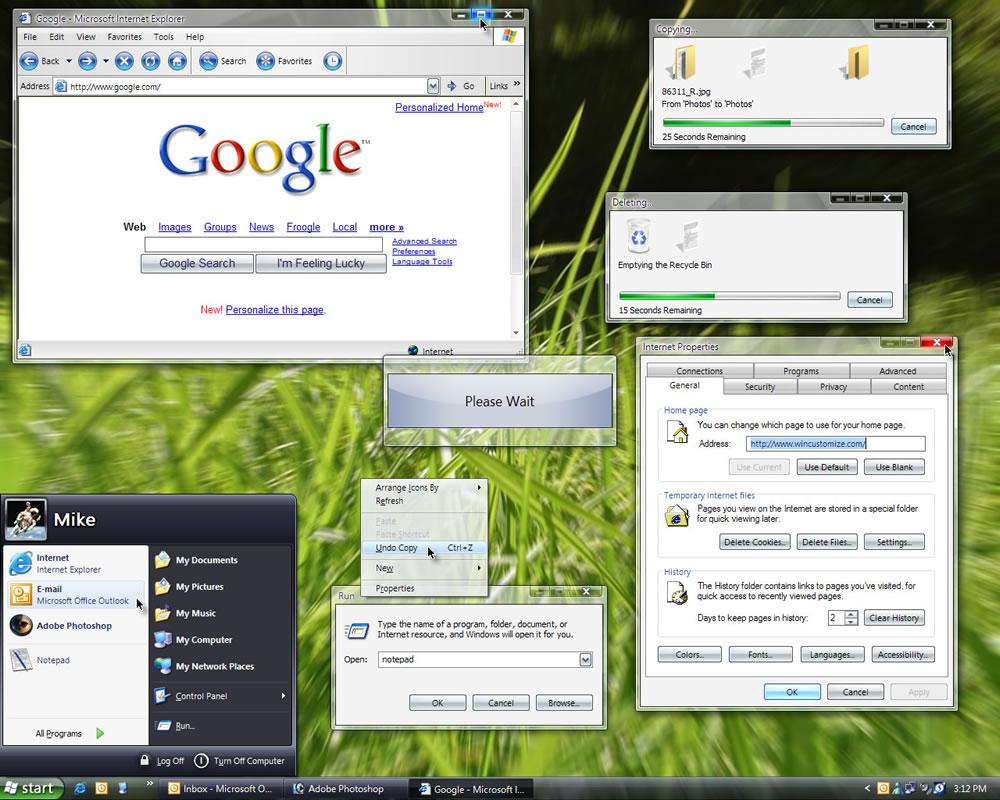 After sifting through the confusing number of versions of Vista and doing some extra research here and there, I've found the best version of Vista would be the Home Premium edition.
Although I'm a bit reluctant to throw money down for the very first time in the direction of the Microsoft empire (I'm actually hoping Google takes over), I think it's better than the hours I spend trying to find cracks and downloading possible viruses onto my system.
That won't keep me from pirating everything else though *cough*... hehe.
Subscribe to:
Posts (Atom)
Popular Posts
-
 The art of designing comfortable spaces. Probably one of my favorite topics to talk about.
 -
 Man I gotta get this. Ain't no room for love for the old guy. Brandon Bird at one of his best. Check out some more here .
 -
 A lil' idea to make that dining room a little more homey - add a piece of desaturated collage work (along with a modern frame) to give y...
 -
 What better way to celebrate than with some hip tunes! TMDP - TMDP (MP3) Beck - Profanity Prayers (MP3) The Rapture - No Sex For Ben (MP3...
 -
 These happy-go-lucky prints from 64 Colors Design make me want to buy a puppy. At $50 a pop , they ain't cheap. But where else are you g...
 -
 Mix a mid-40's cosplay male fanatic, cute girlfriends, and a whole bunch of Chinese pop action and you've got yourself the weirdest ...
 -
 Like Max Payne? Then you'll absolutely love Dexter. The story encompasses our hero, a sociopath with no human feelings or inner moral c...
 -
 There's no pride or success story here. Just another Asian in a miniskirt and a low cut top.
 -
 I'm telling ya these things were art! If it wasn't, why would I want one so badly? Read more here .


